ISBN Book Scanner & Library
Catalog shelves, track reading
I read on my iPad, but I find books everywhere: in bookshops, at friends’ places, on a shelf at someone’s cabin. Book Scanner lets me scan the barcode and save the book to my library on the spot, so I do not have to remember the title or hunt for it later.
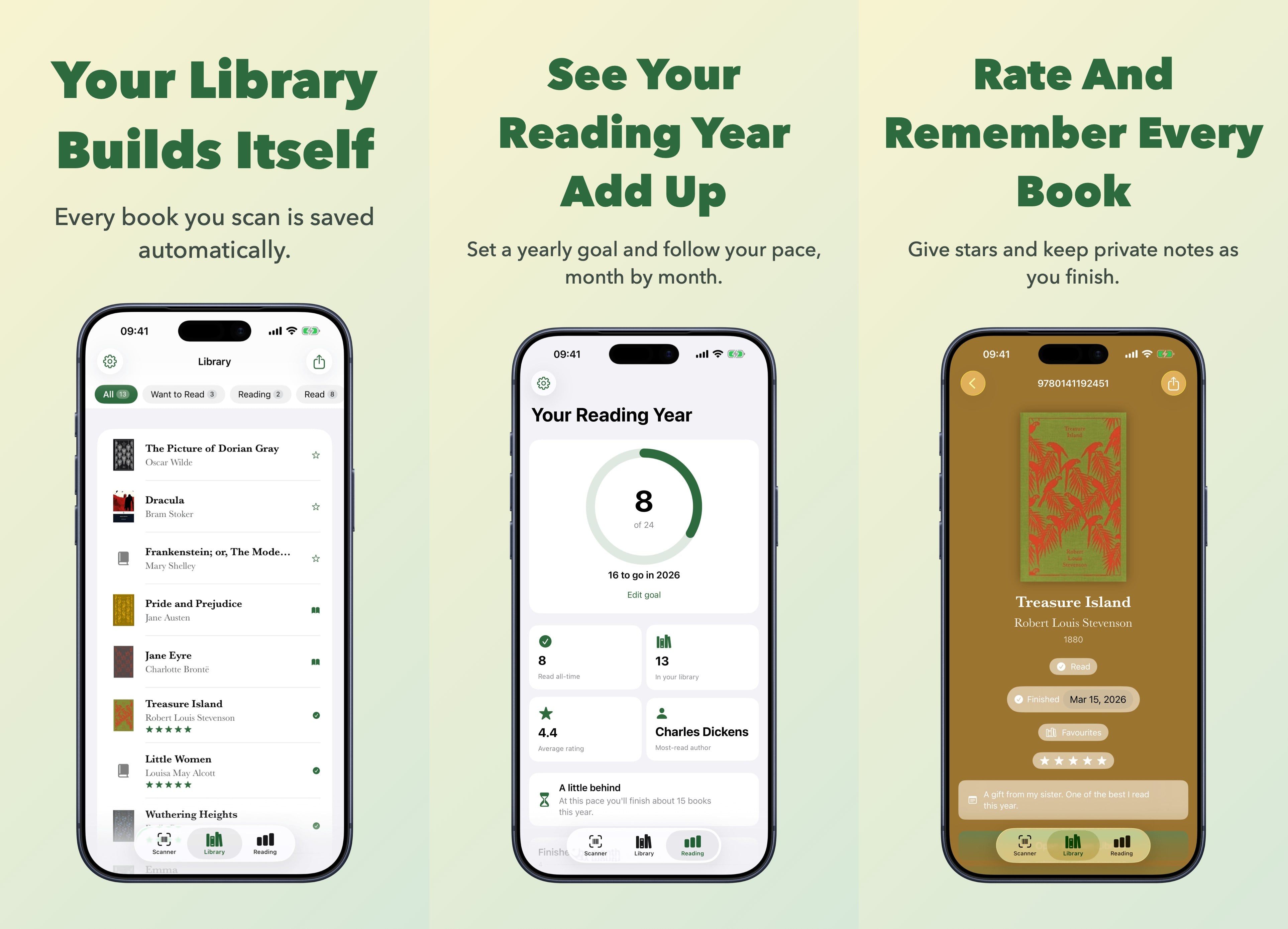
Hold a book up to your iPhone camera and the barcode is read automatically. The app looks the book up across Apple Books, Google Books, Open Library and more at once, then adds it to your library with the cover, title and author. From there you can mark it Read, Currently Reading or Want to Read, sort it onto a shelf, and open it in Apple Books, Amazon or Bookshop.org if you want to buy it.
The part I use most in a bookshop is Shelf Check. Turn it on and scanning stops saving: the app only tells you whether you already own that exact ISBN, whether the same title and author sit on a shelf in another edition, and how you have got on with the author before, down to the average rating you gave them. If you want the book anyway, saving it is one tap. Walk away and the library is exactly as it was.

Set a reading goal for the year and the app turns your library into a picture of it: books read, whether you are keeping pace, your average rating, the author you return to most, and a chart month by month. Setting a goal is free. The full set of insights, along with ratings, notes and export, comes with Premium.
Go Premium
The first ten books and your first shelf are free, every book source is available, and so are Shelf Check and setting a reading goal for the year. Premium is a one-time purchase that lifts the limits and unlocks the rest:
- An unlimited library and as many shelves as you like
- Batch scanning, to catalogue a whole bookcase without stopping
- Star ratings and private notes on every book
- The full reading insights: your pace, average rating, most-read author and the year month by month
- Export your library to Goodreads, The StoryGraph, LibraryThing or CSV
- Your own order for the book sources
- Your preferred Amazon store, from 20 countries
- No ads
Citations
Export book details as plain text, BibTeX or Markdown. Handy for students, researchers, or anyone who needs proper references without the hassle.
Features
- Fast, automatic barcode scanning with haptic and sound feedback
- Shelf Check: scan without saving, catch other editions, and see your history with the author
- A personal library with reading status and custom shelves
- Star ratings and private notes for every book
- A yearly reading goal and a year of insights, month by month
- Export to Goodreads, The StoryGraph, LibraryThing or CSV
- Citations in plain text, BibTeX or Markdown
- Buy on Apple Books, Amazon or Bookshop.org, across 20 countries
- Flashlight for scanning in low light
- Available in English and Norwegian
Privacy Policy