SinceTag: Release Dashboard
Track unshipped work in git
I had a handful of hobby projects moving at once. Some had commits since the last tag, some were nearly ready, and some still had loose ends. Working out which one to release next took longer than the release itself. SinceTag keeps that view in one place on my Mac.

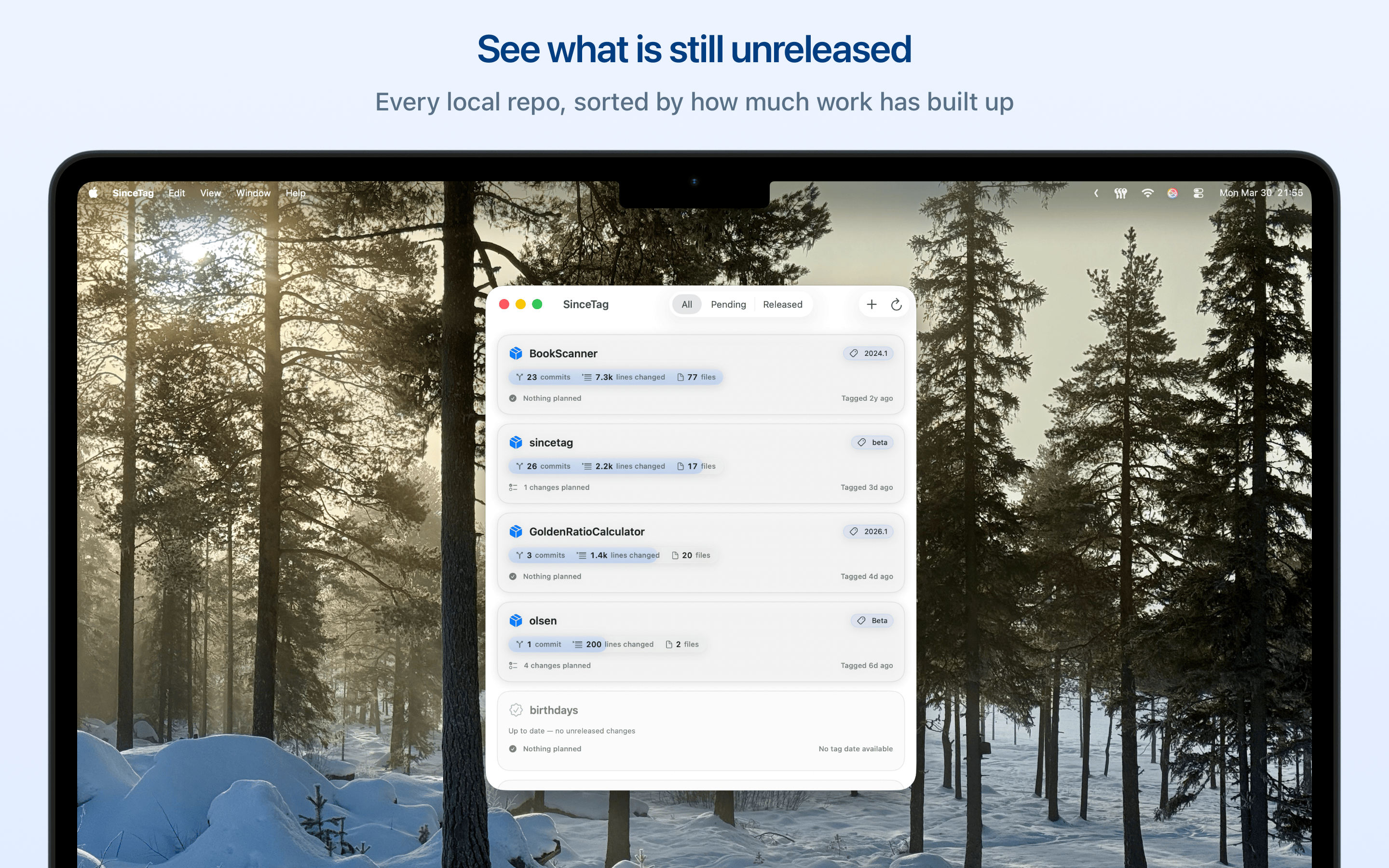
Add your local git repositories and the dashboard shows which ones have unreleased work, how much has built up, and how long it has been sitting there. The projects with the most movement rise to the top, and released repos that still have open launch tasks stay above the finished ones. Release priority is the default. Sort by time since tag, open Launch tasks, open Next items, or name instead, and narrow the list with the filter box, the All, Pending and Released switch, or the icon categories you gave your repos.
Each repo has its own settings, where you can follow one GitHub Actions workflow, Cloudflare Worker, or Cloudflare Pages project. The latest build gives the card a green or red glass tint, with a symbol and a label on every result. Choose per repo whether notifications arrive for failed builds, for all completed builds, or not at all. Clicking one opens the build. Cloudflare connects with your account ID and a read-only API token that stays in the Mac Keychain.
Some projects deploy on every commit, so there is never any unreleased work to track. Turn off Track unreleased work in that repo’s settings and it sorts with your finished projects instead.
Open a repo to read the commits between the latest tag and HEAD, with lines changed and files touched. Older tags and an “Initial commit” section hold the work that came before the first release. The Next tab holds what has to happen before the next tag. The Launch tab covers the follow-up after it: App Store text, screenshot updates, a short release note. Both lists can be filtered and dragged into priority order, and the order persists between launches. When you are ready, create the tag and push it to GitHub without leaving the repo view.
No account is needed for local tracking, and your repository content stays on your Mac. Sign in to GitHub only when a private workflow or a tag push needs it, and connect Cloudflare only when you follow a build there. SinceTag sends static screen and action names to my self-hosted Umami service so I can understand which parts of the app are used. It does not send repository content or action values.
Features
- See unreleased work across several local repos at once
- Sort by release priority, time since tag, open Launch tasks, open Next items, or name
- Group repos into icon categories and filter on several at once
- Follow one GitHub Actions, Cloudflare Workers, or Cloudflare Pages build per repo
- Get notified when a build fails, or when every build finishes
- Mark a repo as always clean when it deploys on every commit
- Review commits since the latest tag, earlier tags, and the work before the first release
- Keep a Next list per repo, filter it, reorder it, and see completed work by version
- Keep a Launch list of one-time jobs and per-release tasks, counted on the dashboard
- Share changelog, roadmap, or launch task text
- Create a new tag and push it to GitHub