Reporting app errors with self-hosted Umami
Part 3 of 5 in the series Self-hosted Umami:
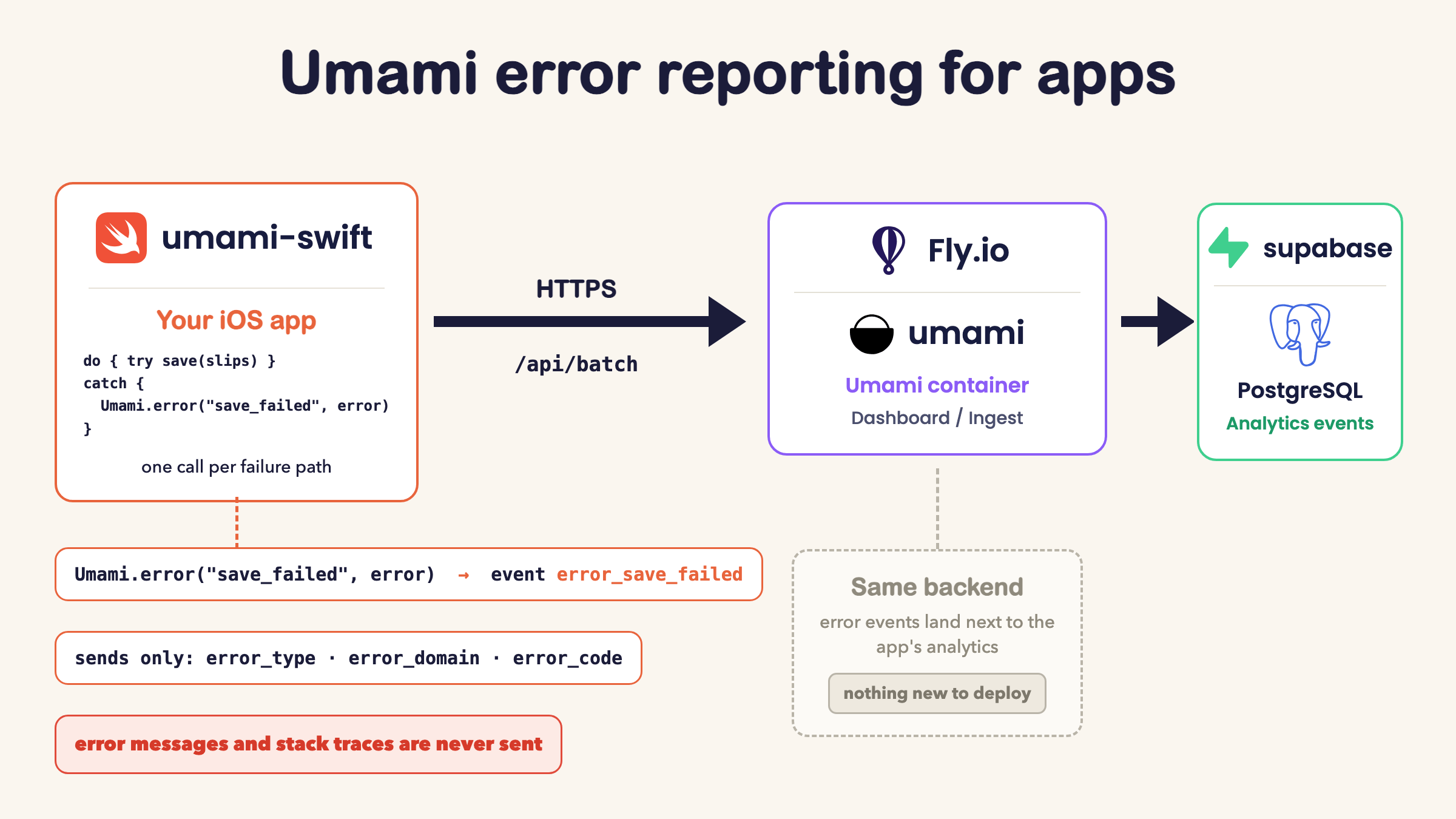
Every app I’ve shipped has many catch blocks to deal with failures which doesn’t crash the app. While I develop, the print in those blocks shows up in Xcode, however, once the app is on someone else’s phone, there is no console for me to read, and the failure disappears. Since version 1.5.0, umami-swift reports those failures as plain analytics events to the Umami backend I already self-host. Why not use what you already have?
What I wanted from error reporting
Crash-reporting was already in place without any work on my part. Apple’s crash reports in Xcode Organizer cover them, with full stack traces, from users who opts in.
Handled errors though had nothing. Mine printed to the console and moved on, so in production every one of those failure paths was invisible. Did creating a Wallet pass ever fail for a real user? No idea. I only wanted to know whether a failure happens at all, how often, and whether an update fixed it. Those are counting questions, and counting is exactly what Umami does.
The solution still had to be privacy first. Nothing stored on the device, and no user content sent anywhere.
The solution
Added a new error method to umami-swift:
do {
    try persistence.save(slips)
} catch {
    Umami.error("save_slips_failed", error)
}
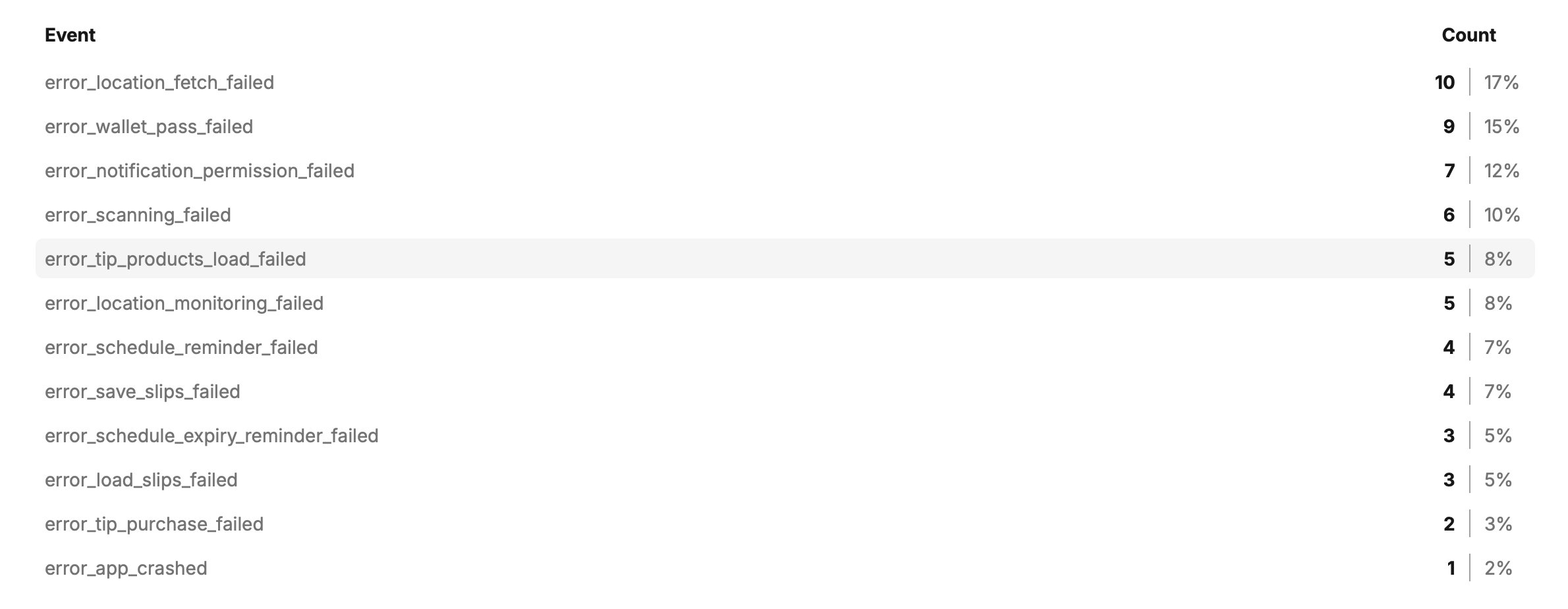
The name is a static description of the failure path, and the client sends it as a custom event named error_save_slips_failed. The prefix sorts every error together in Umami’s Events tab, where each failure path gets its own count and its own chart. Every event already carries app_version, build, os_version, and device_model in its data, so “does 1.4.1 still do this” is just a filter on data that was already there.
Data passed to Umami
Passing the caught error is optional. When it is there, the client extracts three fields into the event data.
error_typeis the Swift type name, likeURLErrororCocoaError.error_domainis the NSError domain, likeNSURLErrorDomain.error_codeis the numeric code, like-1009.
That is enough to tell “offline” from “timed out” from “server said 500” without opening Xcode. All three are identifiers baked into code, the same kind of static string as the event name.
localizedDescription, userInfo, and stack traces are never read. Error messages routinely embed user content, such as file paths with real folder names, URLs, and text the user typed, so thats a privacy no from me. Umami.error also takes no data dictionary, on purpose.
An error event is therefore exactly as anonymous as every other event this client sends. The visitor id still lives in memory only, and nothing new touches the device. The App Store privacy label does not change either, since error events are the same Usage Data the label already declares.
Where the calls go
The rule is one call per failure path, placed where the app already handles or swallows the error. That means the catch block, or the try? that falls back to a default. The existing log line stays, and the event just counts the failure.
Two things stay unreported. Cancellations, because a user closing a sheet mid-request is control flow, and counting it as a failure buries the real numbers. And per-item failures inside a loop, because one broken sync should count once, not eighty times.
Pantelapp, my deposit slip app, was the first integration. Its view model had about ten catch blocks: loading and saving slips, creating the Wallet pass, notification permissions, location lookups. Each got one Umami.error line next to the print, with the caught error passed along for the domain and code.
Crashes get counted too
At configure, the package installs a last-resort handler. If the app dies from an uncaught exception or a fatal signal, the handler writes a one-line marker holding the exception or signal name and nothing else. The next launch reads the marker and reports it as error_app_crashed. Reporting from a crashing process is unreliable, which is why the marker exists. Write two words now, send the event when the app is healthy again.
The privacy rules hold here too. The exception’s reason and userInfo are never read, no stack trace is collected, and the marker says nothing about the user or the session. Apple’s crash reports still own the debugging. This event just puts the crash rate on the same dashboard as everything else, per app version.
Using it in your own app
If your app already uses umami-swift, update the package to 1.6.0 or later. Umami.error and the crash counter come with it, no extra setup.
Starting from scratch takes four steps, walked through in detail in the previous post.
- Add the package in Xcode from
https://github.com/hjerpbakk/umami-swift. - Register the app as a website in your Umami dashboard, with a pseudo-domain like
myapp.ios. - Call
Umami.configureat launch with the website id and the URL of your instance. - Run the app and check that
app_startedshows up in the dashboard.
You also need an Umami instance to point it at. Mine runs on Fly.io and Supabase for a few dollars a month. From there, error reporting is the one line from above in each catch block. Pick a static name for the failure path, pass the caught error along, and read the counts under Events.
The tradeoff against Sentry and Crashlytics
Why not just use a purpose built too like Sentry or Crashlytics? They collect stack traces, breadcrumbs, and device state, and they are built to debug a failure from the report alone. That power costs a subscription or another server to run. It also means collecting far more than my apps have ever sent anywhere.
Without stack traces and breadcrumbs, an error event will not debug a mystery. It tells me which failure paths fire in the wild and whether a fix landed. Reproducing and understanding the failure still happens locally, and Xcode Organizer keeps the crash debugging. That is the same trade-off I made when I picked Umami for app analytics in the first place. If one app ever outgrows counting, that app can get a real error tracker, and the others lose nothing.
For apps this size, knowing that error_wallet_pass_failed spiked after an update is exactly the part I was missing. Luckily, it costs nothing I wasn’t already running. Happy counting.
Part 3 of 5 in the series Self-hosted Umami: